Here's a simple but brutal truth: if your website takes more than a few seconds to load, a big chunk of your visitors are gone before they ever see your content. They don't wait — they hit the back button and head straight to your competitor.
Website speed isn't a "nice-to-have" anymore. It's a core pillar of both user experience and SEO. Google officially factors speed and user-experience signals (Core Web Vitals) into its rankings.
In this guide, with no confusing jargon, we'll explain what website speed really means, what Core Web Vitals are, and exactly what makes your site faster — step by step and honestly.
Quick answer: Website speed directly affects both user experience and conversions, and it's a Google ranking factor. The key metrics are the Core Web Vitals: LCP (how fast the main content appears), INP (how quickly the site responds to interactions), and CLS (how stable the layout is). The highest-impact fixes: optimize images, use good hosting and caching, trim unused code (CSS/JS), use a CDN, and build on a lightweight foundation from day one.
Why Website Speed Matters So Much
Speed isn't just a technical number — it directly affects your money and growth:
- Conversion rate: Every second of delay drives some users away before they buy or sign up.
- SEO and Google rankings: Google favors fast sites; speed is part of how it ranks pages.
- User experience: Visitors see a slow site as unprofessional and untrustworthy.
- Mobile: Most users arrive on mobile with variable connections; a heavy site is a disaster on phones.
In plain terms: a slow site means both fewer visitors from Google and fewer conversions from the visitors you already have. You lose twice.
What Are Core Web Vitals?
Core Web Vitals are a set of Google metrics that measure the real quality of a user's experience when loading your site. There are three main ones:
1. LCP — Largest Contentful Paint
How fast the largest, most important element on the page (like the hero image or headline) becomes visible. Faster is better. Good target: under 2.5 seconds.
2. INP — Interaction to Next Paint
When a user clicks or types, how quickly the site responds. This metric has replaced the older FID. Good target: under 200 milliseconds.
3. CLS — Cumulative Layout Shift
Do elements jump around as the page loads? (That annoying moment when you go to click something and it suddenly shifts.) A more stable layout is better. Good target: under 0.1.
When all three are in the "good" range, users get a smooth experience and you earn a better SEO signal.
First, Measure: Test Your Website Speed
Before doing anything, you need to know where you stand. A few free, reliable tools:
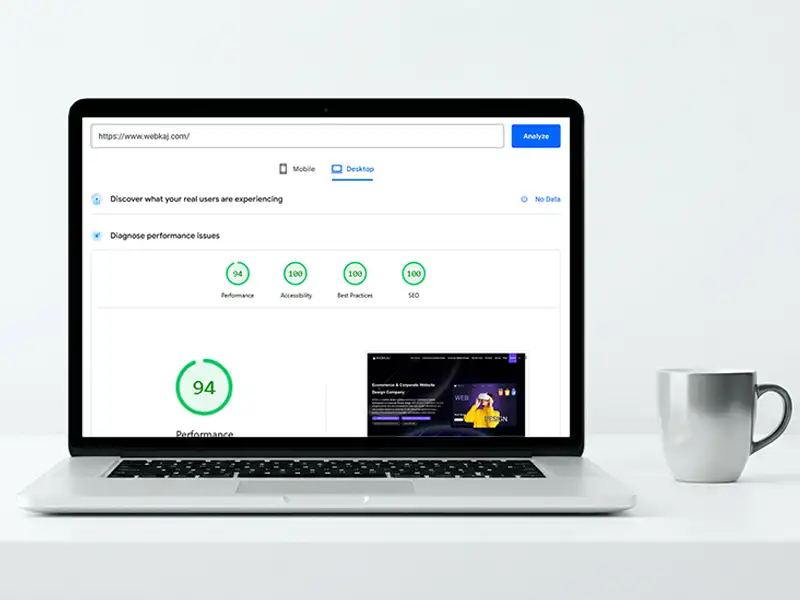
- Google PageSpeed Insights: Both mobile and desktop, with your Core Web Vitals score and improvement suggestions.
- GTmetrix: More detail on load times and heavy elements.
- WebPageTest: For deeper, more advanced analysis.
Important tip: Don't just stare at the "score." Read the detailed report to find out what exactly is slowing your site down — that's usually where the real answer is.
The Most Effective Ways to Speed Up Your Website
Let's get practical, from highest impact to lowest:
1. Optimize Images (usually the biggest culprit)
Heavy images are the most common reason sites are slow.
- Use modern, lightweight formats like WebP.
- Resize images to their actual display size (a 4000px image shown at 800px is pure waste).
- Use lazy loading so images only load as users scroll to them.
2. Strong Hosting and Caching
- Cheap, low-quality hosting cancels out every other optimization. Invest in a solid foundation.
- Caching pages makes the site load far faster on repeat visits.
3. Reduce and Compress Code (CSS / JS)
- Remove unused code and inactive plugins.
- Minify and combine CSS and JS files.
- Load non-critical scripts with
deferorasyncso they don't block content from rendering.
4. Use a CDN
A Content Delivery Network serves your files from servers closer to each user, so load speed improves for visitors in different regions.
5. Cut Down Requests and Extra Plugins
Every plugin and external script (chat, analytics, fonts, widgets…) slows things down. Keep only what you truly need.
6. Optimize Your Fonts
Heavy or numerous fonts slow loading. Reduce the number of fonts and use optimized loading (like font-display: swap).
7. Clean Code and Database
A site with clean code and an optimized database is fundamentally faster. This is where the initial build quality really matters.
Action Summary (highest to lowest impact)
| Action | Impact | Difficulty |
|---|---|---|
| Optimize images | Very high | Low |
| Good hosting + caching | Very high | Medium |
| Compress CSS/JS | High | Medium |
| Use a CDN | High | Low |
| Remove extra plugins | Medium–high | Low |
| Optimize fonts | Medium | Low |
| Clean code & database | High (long-term) | High |
An Important Reality: Speed Is Built From Day One
Let's be honest: many speed problems can't be fully fixed later. If a site is built on a heavy foundation, a bloated template, and messy code, you can only improve it a little — it will never match a site that was built lightweight and clean from the ground up.
That's why speed, just like SEO, needs to be in the site's DNA from day one of design, not patched on at the end. It's one of the biggest differences between a professional site and a cheap one. (We cover the importance of technical quality more in our how to choose a web design agency guide.)
3 Common Myths About Website Speed
1. Obsessing over the PageSpeed "score." A 100 isn't the goal; real user experience is. Sometimes an 85 with a great experience beats an artificial 95.
2. Installing a speed plugin on a bad site. A caching plugin isn't magic; if the foundation is heavy, it's just a painkiller.
3. Ignoring mobile. Most users are on mobile; measure and optimize mobile speed separately.
Wrapping Up
Website speed isn't a "set it and forget it" task; it's an ongoing process. But if we had to sum it up: lighten your images, invest in good hosting and caching, trim unnecessary code, and build the site lightweight and clean from day one.
If your site is slow and you're not sure why, or you want a fast, SEO-ready site from the start, the Webkaj team — with 18 years of experience and 900+ successful projects — can review your site in a free consultation and tell you honestly how to improve it, even if you do the work yourself.
Get a free consultation | View our portfolio
To keep going, also read our guide on how to rank higher on Google, since speed is one of the core pillars of ranking


